· 16 min
A screen for 3 a.m.
One idea from my wife, 21 canvas comments and twelve phases in 30 hours: our night-feed screen, rebuilt from the iPhone SE to every pose of iPhone Duo.
ProbaBaby’s Log screen is built for the night. One tap starts a feed on the left or the right, logs a diaper, starts a sleep. By day it’s cream; at night it turns red on black, and the phone sits on the nightstand. Since our baby was born in May (A newborn app, with a newborn), it’s the screen my wife Esma and I reach for in the dark, and most of our feeds are logged on her phone. Esma is also the app’s first user and its daily tester.
This note is about one redesign of it, from 22 to 24 October 2026: an idea of Esma’s, what I decided on a canvas, what a phone that folds asked of the screen, and what the agents that built it measured and caught. AI wrote the code; the calls are mine. My prompts and comments are quoted with the spelling fixed, and all times are UTC.
Where it started
The screen has a history. Its file goes back to January 2026 and had 85 commits by 24 October. In May I redesigned it in Figma, twelve frames: cream by day, red on black by night, and never any other colour. On 18 October I reported that it was “time to time not following day color” and that “brightness sometimes don’t follow phone brightness level”. The audit behind that fix listed 46 findings, and it left one owner for each concern: one for the look, one for the brightness, one for the dimming.
On 22 October at 13:22 I passed on an idea:
“My wife told me, it can be better if we put brightness slider, flash section on top (dock version can stay).”
The dock version is the landscape layout, the phone on its side on the nightstand. In the same message I asked for the Feed Timer, the row of next-feed reminder presets, to hide itself: “after 6 months - it can be hide automatically … User can also can be hide this earlier, give similar control of solid foods settings.” That part was in the app twenty minutes later: shown by default, hidden from six months, the age adjustable from three to twelve, and a reminder that is already counting down stays until it fires or is cancelled. A row that helps in the first weeks is clutter at six months.
One idea, then another question
Esma’s idea went onto a canvas in Claude Design (See it before you build it says what a canvas is) as three options. A moves today’s brightness and flashlight row up under the header. B makes one top bar: close, slider, light, moon. C keeps the header and opens the slider from a sun button. The canvas recommended A, and A is what was built.
My first comment, at 13:46, was on A’s new row, and it changed the question:
“what is this row for? I think bottom part we need to work on a bit more. The main action button (stop button here) should have stable - fixed place - can be a bit down.”
So I hadn’t read the row as brightness at first; its suns got bigger. And the real subject became STOP. Until then STOP sat at the end of the session block, so where it was depended on what was on screen. Within minutes the canvas put STOP in one fixed slot across every state, and that rule became decision 1 of the plan:
- a slot 64 pt tall (scaled to the screen), 12 pt above the home indicator;
- laid out in every state: Pause and STOP while feeding, STOP alone while asleep, empty while awake, so nothing moves when a session starts;
- the timer centred in the space between the grid and the slot, the grid anchored under the header.
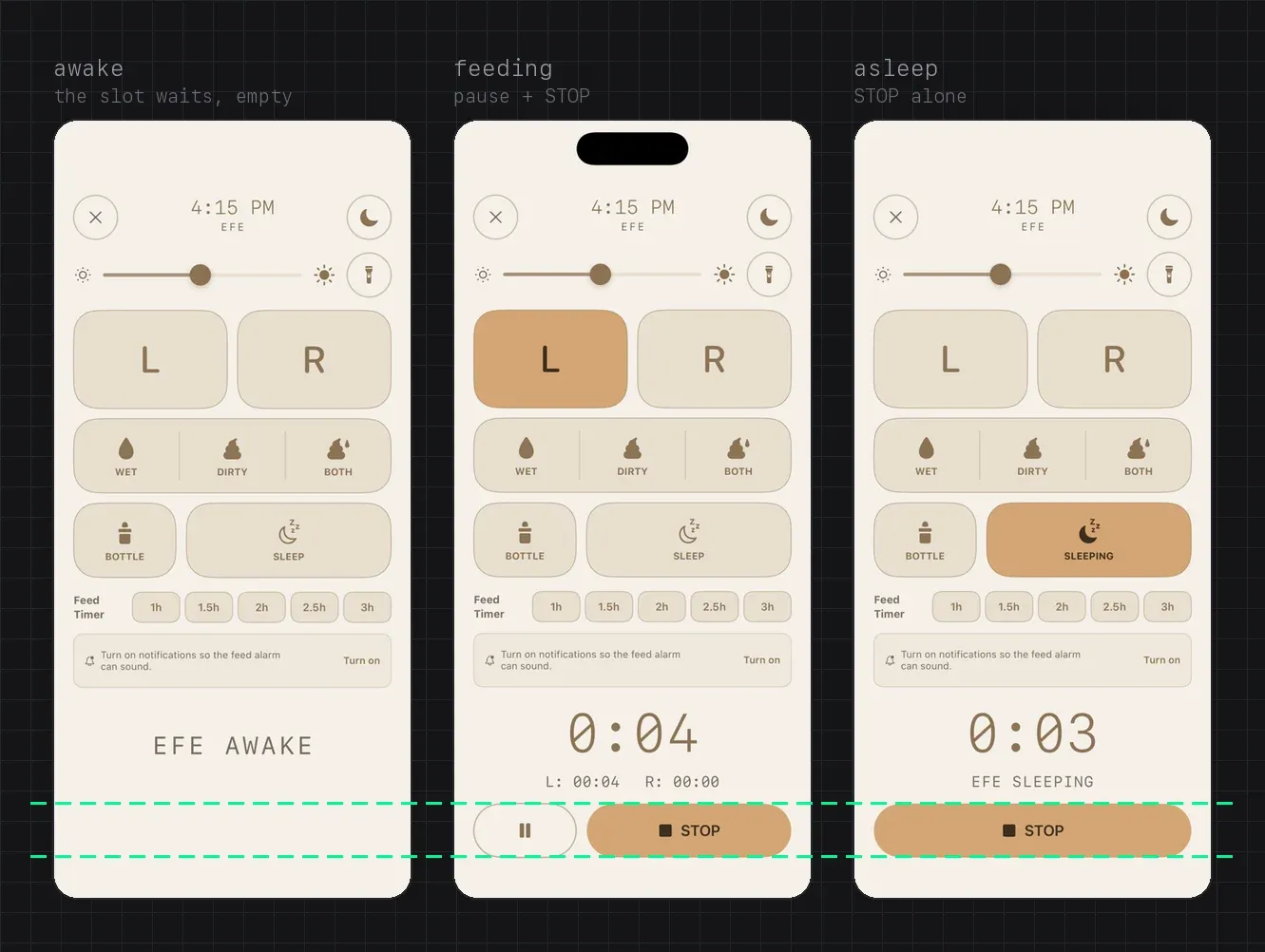
The same pass settled smaller things the canvas made visible:
- One corner radius. L and R had a 40 pt corner and every other button 28. My comment: “corner roundness needs to be equal, breast buttons has more roundness. this is needs to re-check in every variations.” They share one radius now: 28 on phones and iPad, 24 on the Duo.
- One baseline. Icons of different heights pushed their labels off one line; every icon now sits in the same box.
- One stop. While a sleep ran, the Sleep button read “Stop sleep” beside ■ STOP: two stops for one sleep. It reads SLEEPING now, and only the slot says STOP.
- Short screens. “we need to think about iPhone SE users. bottom timer and spacing can be smaller.” Under 700 pt of height, the timer drops to 44 pt and the gaps to 8.
- a comment22 oct, 13:46
- a boardone fixed slot, every state
- decision 1in the plan
- the slotlaid out in every state
- “too close to bottom”slide to stopopt-in, after feedback
The diagram, step by step:
- 22 October, 13:46, on option A: “The main action button (stop button here) should have stable - fixed place - can be a bit down.”
- Within minutes, a board puts STOP in one fixed slot across every state.
- Its rule becomes decision 1 of the plan.
- The code: a slot 64 pt tall, 12 pt above the home indicator, laid out while feeding, asleep and awake.
- Then feedback: STOP is too close to the bottom. An opt-in slide to stop, and a slot that grows where there’s room.
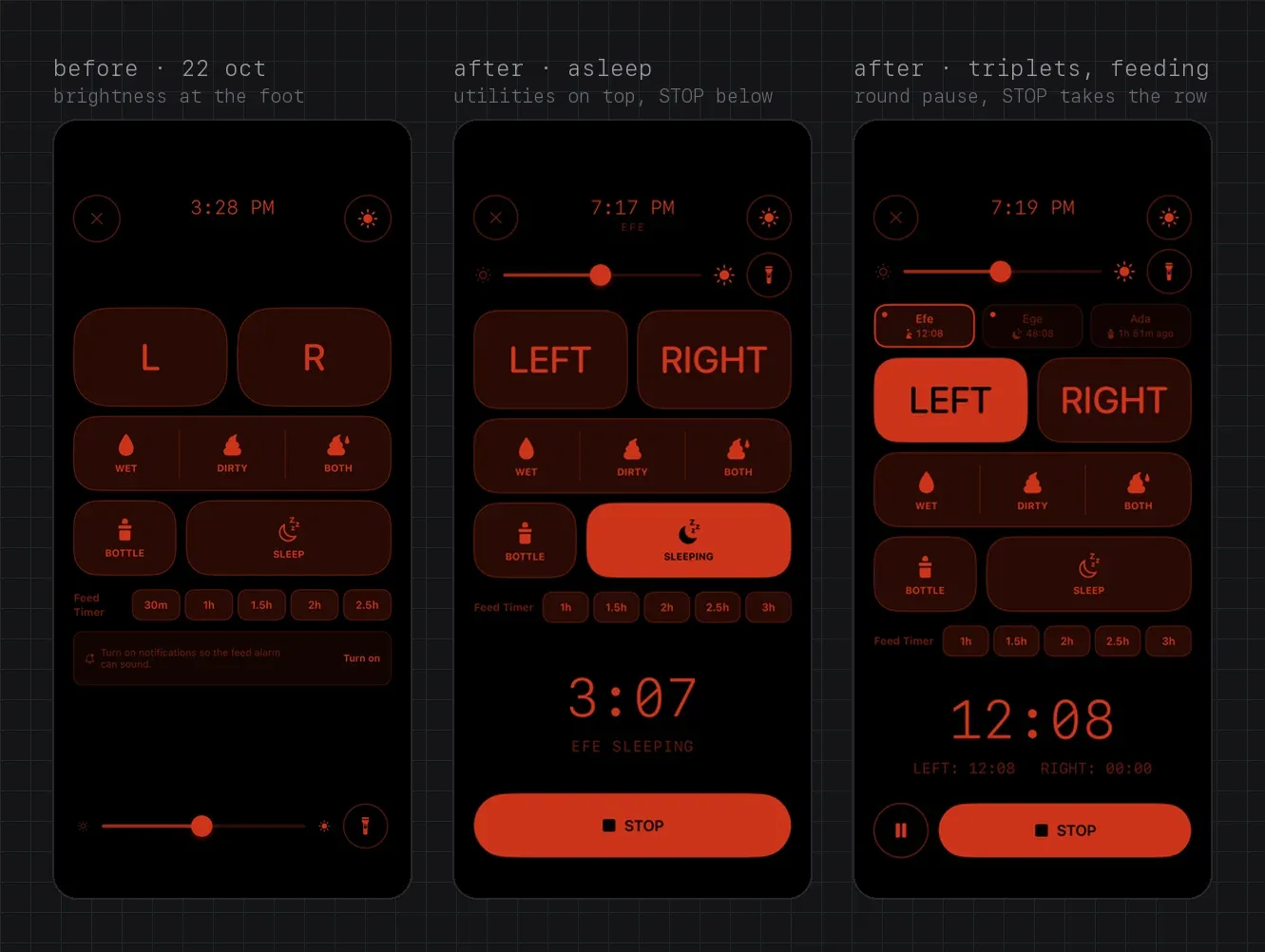
Then the slot met a real thumb. On 23 October at 22:58 I passed on feedback:
“I got feedback that – stop icon is too close to bottom side. This is not a issue but for example in big phones, when a user trying to go back home they can mistakenly click the button. We may use like iPhone open call option, moving the button left to right, similar usage in alarms (in lock screen) – but this can create another step for stopping.”
I wanted it optional, “and can be changed in feeding settings maybe”, and I wanted the buttons bigger where the screen had room: “for multiple it can be smaller but for singlets we can do it bigger buttons at bottom, based on available size, dynamically, but there should be min size so it won’t be so small.”
So Slide to stop is a switch in Timer Settings, off by default, so nobody’s STOP changes with an update. The knob has to travel at least 85% of the track. A tap, a half slide, or a swipe up from the knob, like the home gesture, doesn’t stop anything: real drags in a UI test on the Pro Max simulator checked each one. In Arabic it slides the other way. For VoiceOver, Switch Control and Voice Control, STOP stays one button with a default action, so nobody has to drag. The slot also grows into spare height, up to 88 pt on a Pro Max with one baby, and Pause became a circle so STOP gets the rest of the row.
Twins to quadruplets
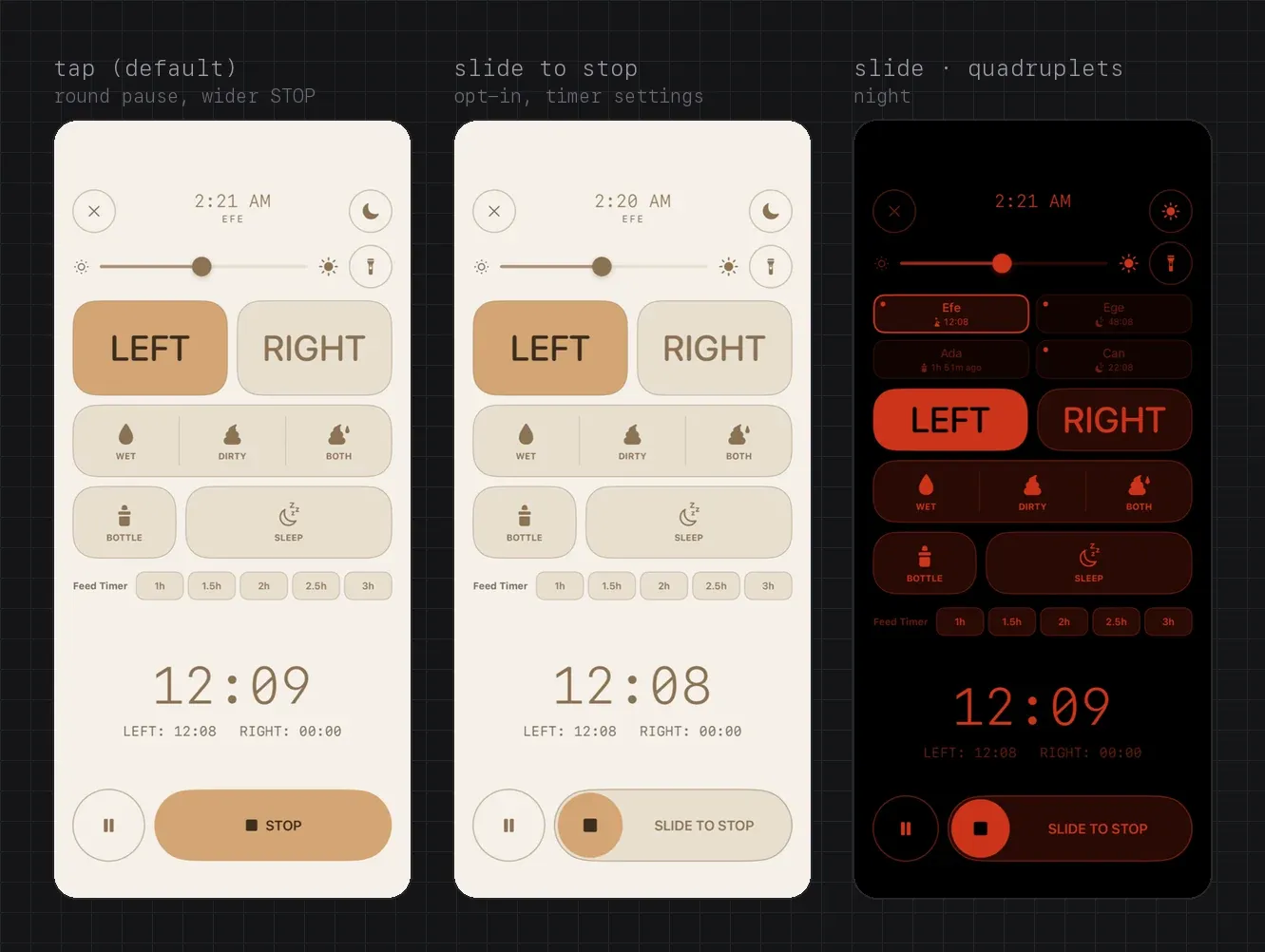
Most people who sign up aren’t expecting just one: 76% of onboardings in the twelve weeks to 11 October declared twins or more (Twins found us). My third comment, on 22 October, was “we need to think about, twins, multiples approach as well.” The next morning, eight of my comments were about names and multiples. The first asked for long names, and the canvas added a stress row: Maximilian-Alexander, Muhammed Mustafa, Muhammed Emin.
What the comments decided:
- Twins get two chips in one row. Triplets get three in one row: “seems like we should not use two row for triplets, only for 4 and more.” Quadruplets get 2 × 2.
- A long triplet name wraps to two lines, 14 pt clear of the chip’s edges, then truncates: “make sure the name not too close to edges, and if not fit in two row, truncate it in second row.” A short name hugs its text: “if the name short - hug the text, in this version status below look very off.”
- Each chip shows its baby’s state as an icon and a time, because a sentence doesn’t fit in German.
- The live dot sits top-left: “this dot can be same approach as last used breast. left top.” The L and R buttons mark the side used last with a dot in their outer top corner, so one dot means one thing.
- L and R are 100 pt tall with two or three babies. From four, they and the action rows shrink to 76.
Each chip is one VoiceOver element. A reviewer caught two things there: “34m ago” is read as metres, so the spoken value uses whole units (“Last Fed, 1 hour, 51 minutes ago”), and the spoken time went stale while the one on screen kept ticking.
L and R in 32 languages
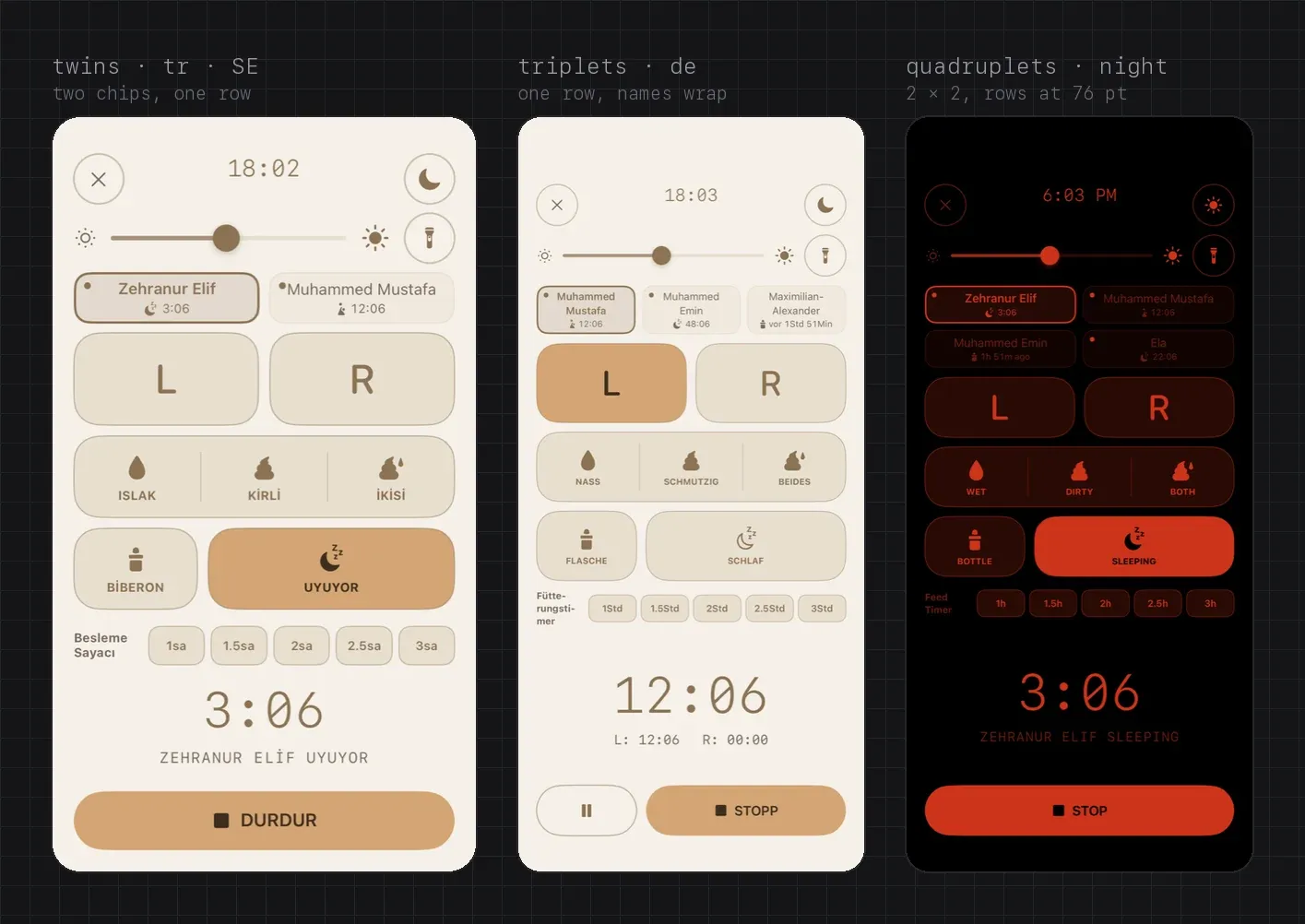
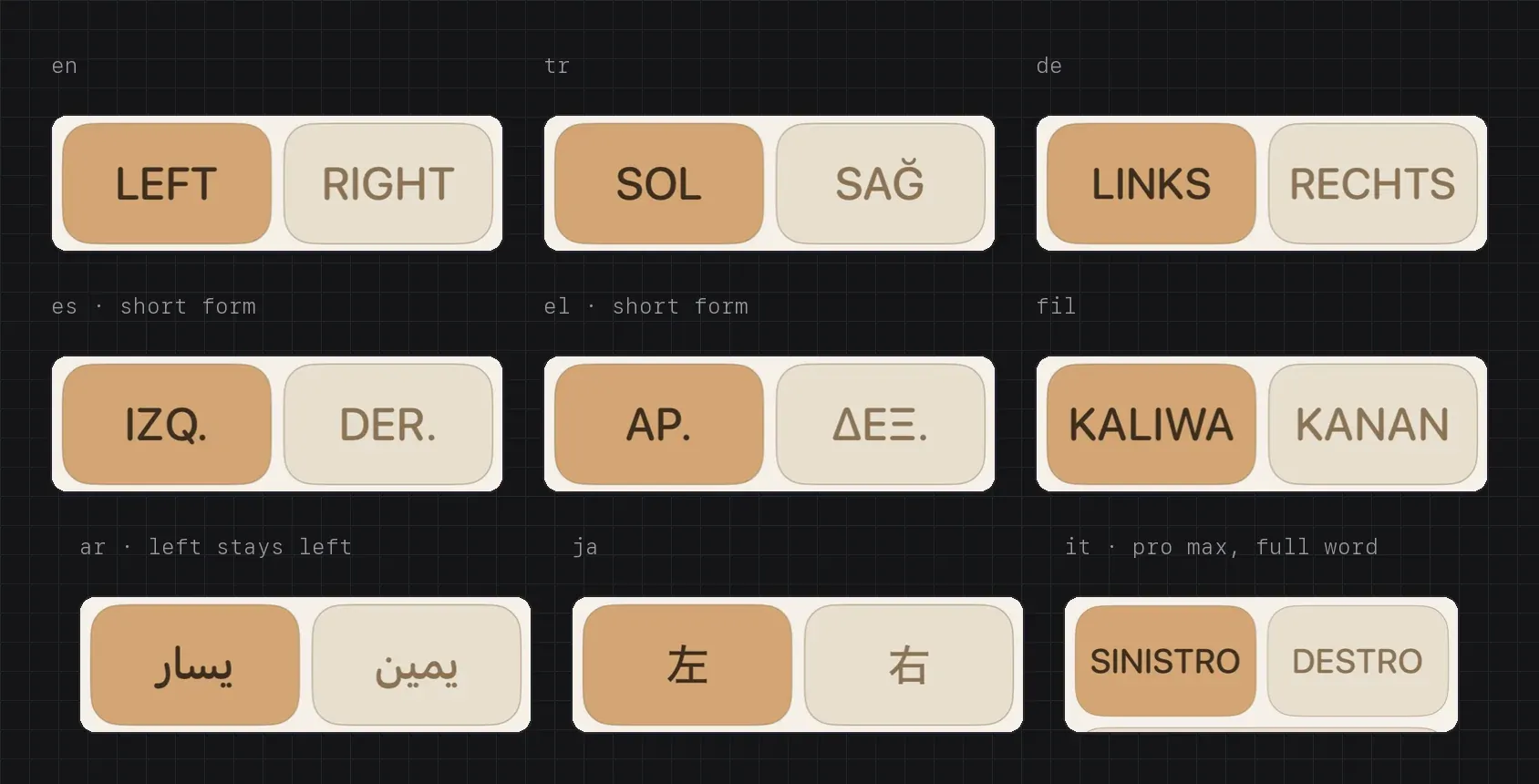
Until this round the two biggest buttons said L and R in every language, Latin letters even in Japanese or Greek. My comment: “we need to test L - R – in all language we have, shorter form each language if it’s longer, title size can be dynamic based on text length.”
Now each language has its own words, and the pair shares one size: the largest at which the longer word fits. Under 30 pt both switch to a short form: IZQ./DER. in Spanish, SX/DX in Italian, ESQ./DIR. in Portuguese, ΑΡ./ΔΕΞ. in Greek, all still waiting for a translator’s check. A language with no short form keeps shrinking rather than get an abbreviation nobody has checked. In Arabic the row stays left to right, so يسار is under the left hand: a body doesn’t mirror with the text. The same words reach the per-side timer and the Live Activity, which shows them only where they stay legible and falls back to L and R elsewhere.
The canvas had a long-text stress row before any code, and it predicted one bug. In German the Feed Timer label, “Fütterungstimer”, couldn’t fit its fixed 56 pt column and broke mid-word. It did, in every German screenshot of the multiples phase. The term is now “Fütter-Timer”, which breaks at the hyphen, and the column hugs its label up to a cap that grows with the text size.
Every size, and a jump
One comment listed every size at once: “we need to think about, iPhone Duo screens (folded, unfolded), iPad and smaller iPhones.” The SE got its compact mode. The iPad’s 1.2× scale is now capped by height too: a 760 × 800 window had used it and pushed the timer out of view.
One rule went entirely. On iPads, and on any window wider than 460 pt, the grid and the timer had been centred as one group, so starting a feed moved the grid about 43 pt, under the finger that had just tapped L. That broke decision 3: the grid “never jumps”. The same check found that centring the timer had worked only by luck of pixel rounding: with twins on an iPad, the whole stack floated. The screen now measures instead.
A phone that folds
Apple announced iPhone Duo on 9 September 2026. It went on sale on 23 October, the day I reviewed these boards. On the canvas the foldable had started as a placeholder, labelled “Foldable unfolded · ≈ 760 × 830 (approximate)”. At 10:53 I commented: “we need proper design for iPhone Duo, look online first for the dimension and approaches.”
The first reply flagged that “Apple hasn’t announced an ‘iPhone Duo’ or any foldable”. The model’s knowledge stopped before the phone existed. The session caught its own mistake before drawing anything: it searched, and redrew the boards at the sizes it found, 466 × 678 pt for the cover and 951 × 669 open. That afternoon the simulator measured them and corrected one more number: the side column the system keeps for the camera, time and status is 84 pt on both displays, not about 94 on the inner one. Held upright, there is no side column at all.
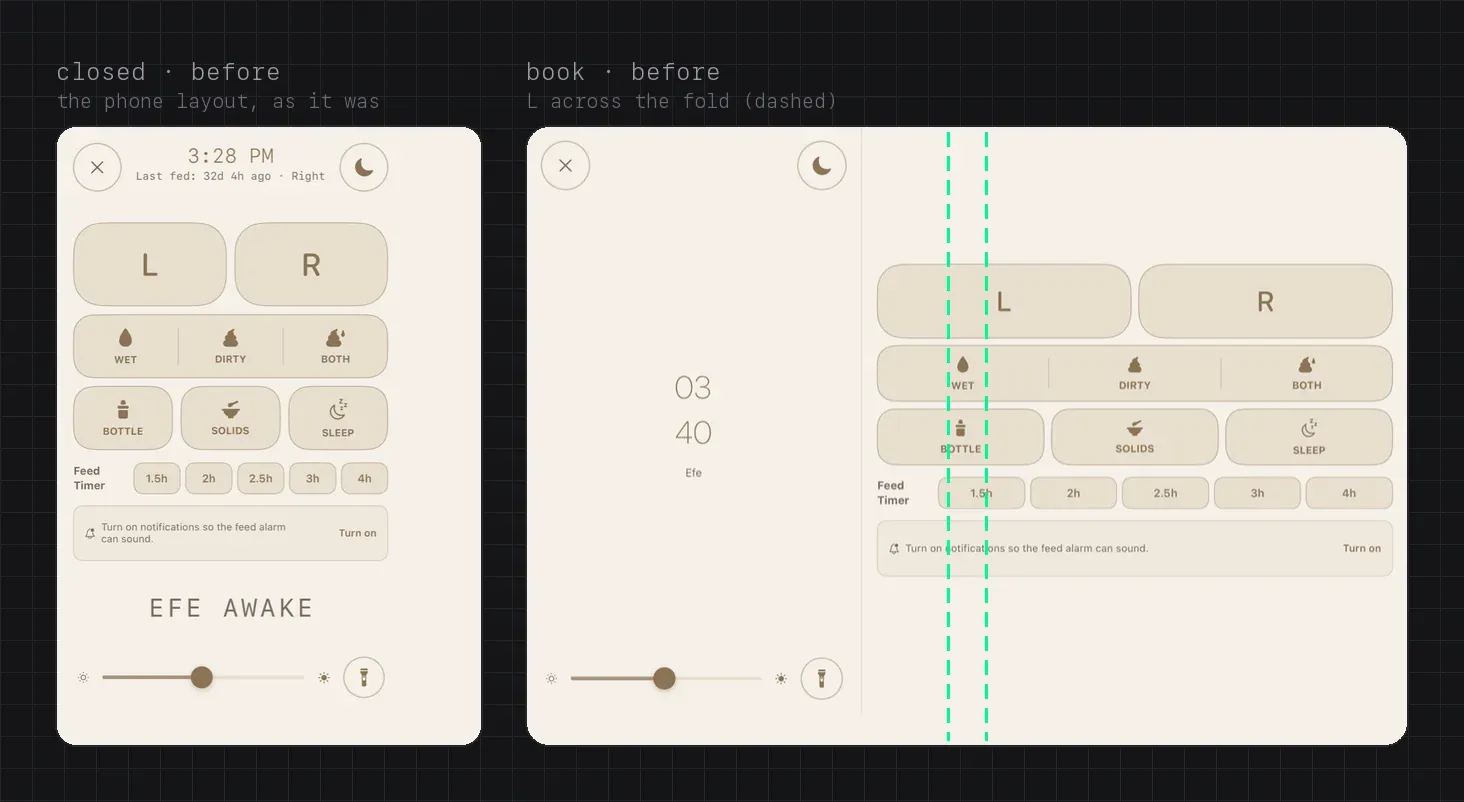
At 11:15 I wrote: “Duo needs separate layout like iPad. All controls needs to be on right side. We may need to hide texts. like vertical buttons. in this area, place close, theme, torch icon in group then CTA group, stop pause. Please look proper designs online.” The next board put a rail on the right. At 12:01 I sent a screenshot of Mail on the Duo’s cover: “on closed version the action buttons moves to right side, check the image … in current approach you just move it to side.”
That was the difference. Mail’s buttons don’t sit in a rail of their own beside the content; they live inside the system’s side column, under the camera, the time and the status icons. On the Duo, iOS 27.1 merges an app’s bars into one vertical bar there. The design that followed:
- Close alone at the top, then one pill of theme, torch and brightness, a spacer, and Pause above a tall STOP at the foot, where Mail has Compose. “make this button taller”: STOP became 140 pt.
- A slider can’t live in that bar, so brightness opens as a pill in the content.
- One clock: “I think we can hide this on Duo closed version, as we have time on right section as default.”
- Open is the same screen plus one level more, a Today block, never just bigger buttons.
I asked for help too: “We may need to have iPhone Duo skills if there is any online please check.” Apple ships agent skills with Xcode 27.1, one of them for getting an app ready for the Duo, and two community projects had published more, among them a linter and a tool that photographs an app in every pose by pressing the simulator’s pose buttons. Their scripts were read before anything was installed. The linter found 34 issues across the app, none of them in the Log.
At 12:38 I asked for the rest: “can you check these variations – for example booklet, dock version? and also in split version, app can be positioned left side in inner screen so side controls needs to be on left side. We need to make it super good, and we can send it [to] Apple for featuring the app, it can be useful.”
The side bar against the night
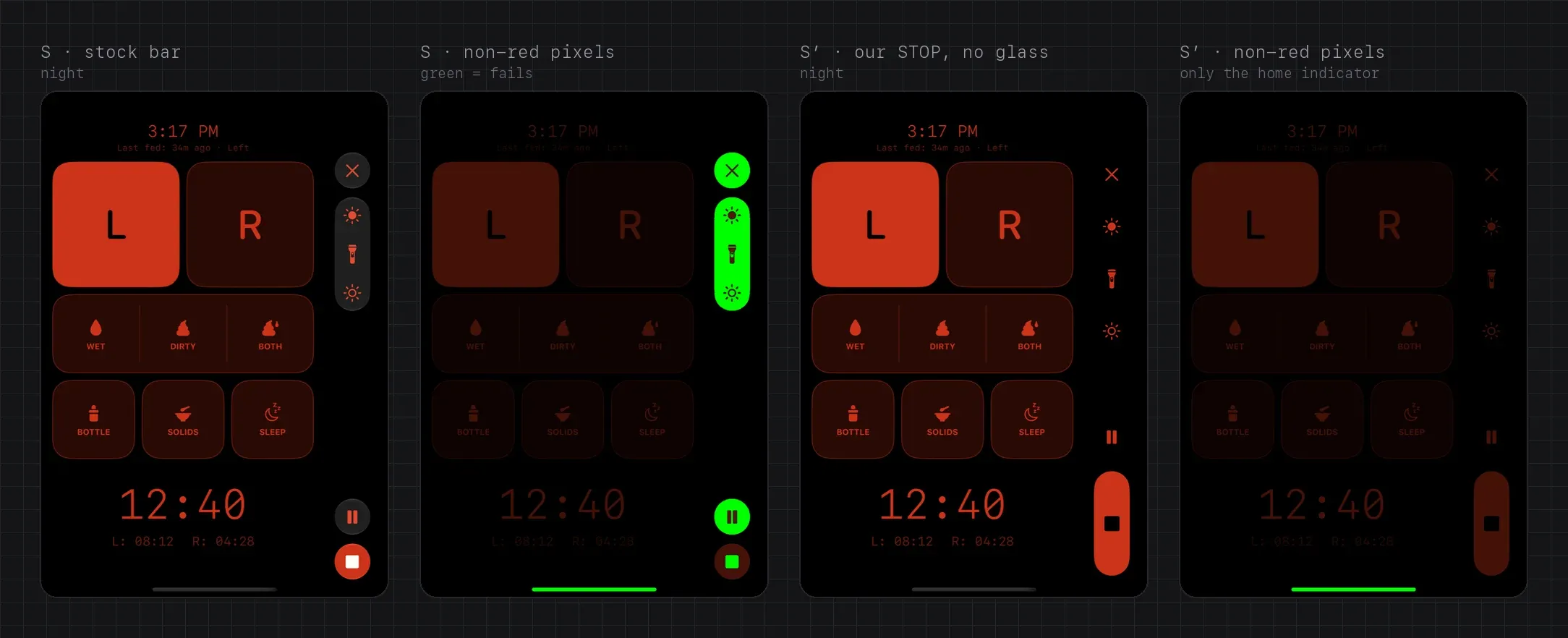
The Log’s night look has one rule: red on black, nothing else. Apple’s side bar is glass. So before building the Duo layout, a throwaway build tried five ways of putting our controls in that column, and shot each one closed and open, by day and by night; the two strongest also went into Split View. Every night frame was checked pixel by pixel: a pixel passes when it is near black, or its green and blue are at most half its red.
- S, the stock bar, failed: 90,240 grey pixels on the cover, in the glass capsules and the STOP disc. With the glass hidden it still failed, 2,781 pixels, because the system drew STOP’s glyph white.
- S′, the system bar with our own 48 × 140 STOP and the glass hidden at night: 0, with Split View, the island and VoiceOver coming from the system.
- C, our own rail drawn in the column: 0, but a hand-built bar, so the edge, the island, overflow, right-to-left and VoiceOver would all be our code.
- C with vertical bars switched off: the system dropped the side column from the safe area, and in Split View on the left the rail landed beside the fold.
- H, the system bar plus a floating STOP: the STOP covered the SLEEP tile and the timer.
| red only at night | what else | |
|---|---|---|
| S · stock bar | 90,240 grey pixels | glass capsules; STOP a small disc |
| S′ · system bar, our STOP | 0 | Split View, island and VoiceOver from the system |
| C · our own rail | 0 | a hand-built bar: every rule is our code |
| C · vertical bars off | — | the column leaves the safe area; the rail lands beside the fold |
| H · bar + floating STOP | — | STOP covers the SLEEP tile and the timer |
The diagram, step by step:
- The stock bar fails at night: 90,240 grey pixels on the cover, in the glass and the STOP disc.
- S′, the system bar with our own tall STOP and the glass hidden at night: 0.
- C, our own rail: also 0, but every rule a system bar gets for free is our code.
- Switching vertical bars off drops the side column, and a floating STOP covers the SLEEP tile and the timer.
- I pick S′ the next morning.
I picked S′ the next morning at 09:11: “I totally agree with S′ – you did a great job, I’m impressed.”
Six poses, one layout
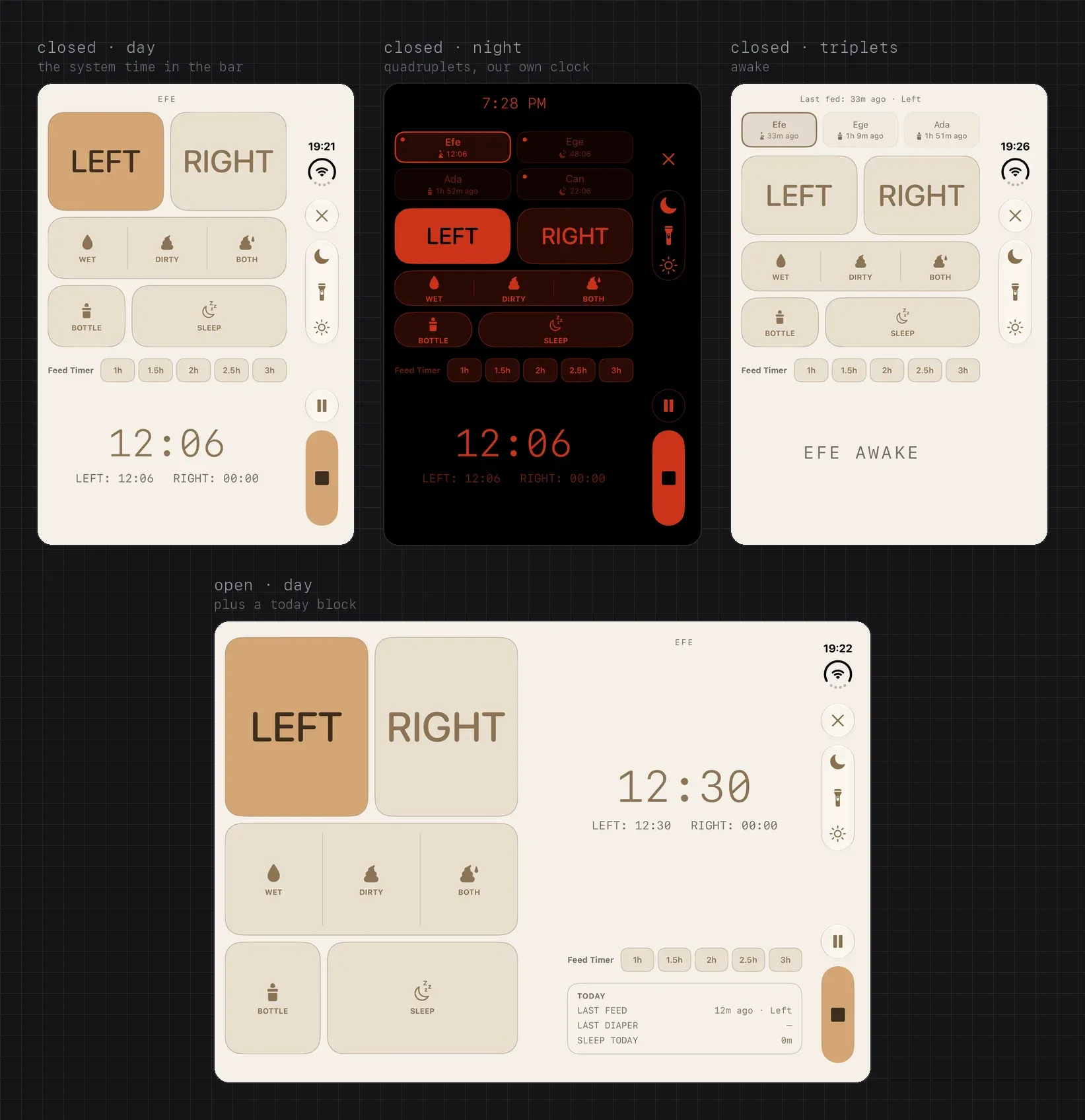
The Duo can be closed, open, half folded like a book, propped like a laptop, stood like a tent, or held upright, and it does Split View. The layout reads what the system reports, the bar’s edge, the size classes, the view’s size and the fold region, and never the device model.
- Closed: the side bar per S′, the grid filling the space above a fixed status area. By day the system time shows in the bar and the Log draws no clock; at night the status bar hides and the Log shows its own.
- Open: the grid on the page before the fold; the timer, the Feed Timer and the Today block (last feed, last diaper, sleep since midnight) on the page after it. Nothing sits on the fold.
- Book: the open layout, with the band around the fold widened from 40 to 64 pt.
- Tent: the cover on its side, the closest thing to the nightstand dock. The big timer sits away from the bar, the grid beside it.
- Laptop: the standing half shows only “Last fed”, the 112 pt timer or the idle clock; every control is in the flat half.
- Upright: Apple keeps bars horizontal there, so the phone’s own layout returns, cut at the fold.
- Split View: the bar on the app’s outer edge, on either side. With the Log on the left, it shows its own clock; the system time stays with the app on the right.
More than once a board lost to a measurement. The tent board drew a 96 pt STOP; the real bar has about 350 pt on that side, and at 96 STOP fell into the overflow menu, so it’s 56. The tent’s Feed Timer row moved to the foot, where its chips stay wider than 44 pt. And a reviewer caught one more: in the laptop pose, tapping L brought up the “started earlier?” chips and shrank L and R under the finger, so the band that holds them is now a fixed 68 pt.
Folding must not lose anything. The open bottle picker, the brightness pill, a pending diaper confirmation, the “woke earlier?” prompt and the dimmed screen all survive closed, tent, open, book, laptop and upright. Probes on the grid and the status logged each one appearing once per run across every pose change; before the fixes, on every change. Pose changes move over 0.3 seconds, and without animation under Reduce Motion.
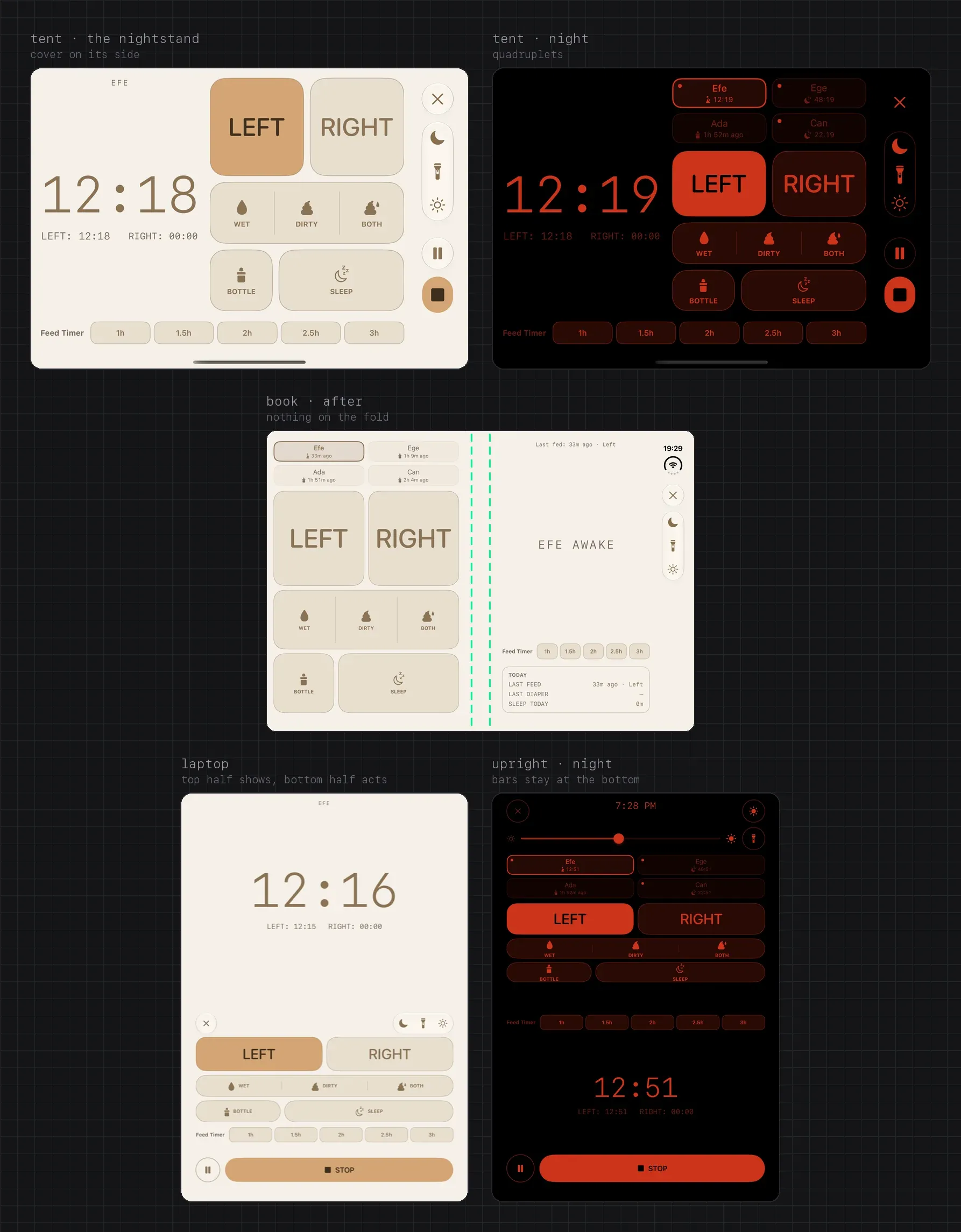
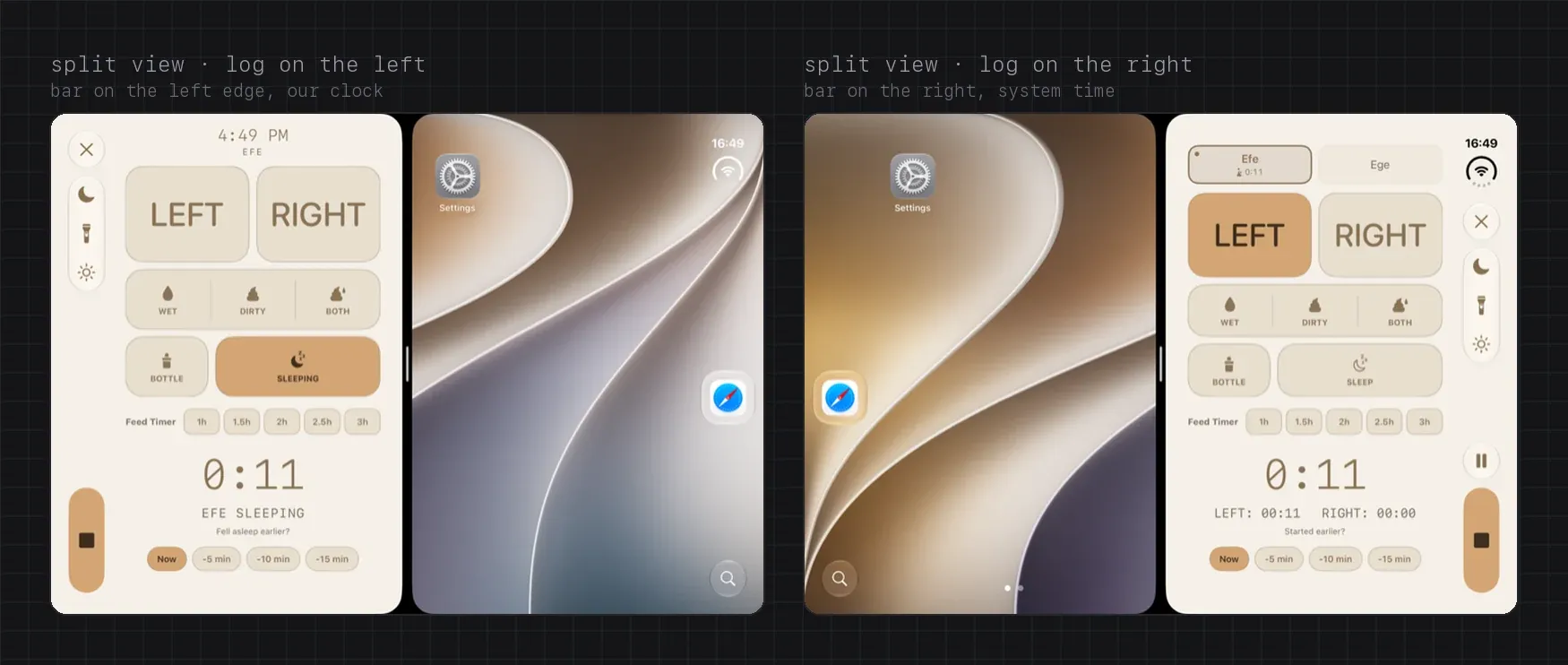
Two finds went beyond the Duo. The Log didn’t always rotate when the phone turned: the app changed its allowed orientations without telling the system, so a turn could meet the old, portrait-only answer. And turned sideways, the app beneath the Log grew taller than the window and pushed the Log off centre. As planned, the brightness the Log sets now follows the window to the other display when the phone opens or closes: the two displays are two screens.
During the QA pass I asked for two more changes: “I think – when we have space move the title for Diapers, bottle, sleep etc on right side. Duo half open version. And also we need to limit text size increment in log screen as it is breaking the UI.” In the laptop pose the labels now sit beside their icons. And the Log’s text stops growing at the xxLarge size, with the Large Content Viewer for people who use the accessibility sizes. That one is a trade-off, not a fix: at those sizes words had been clipped to “SCHMU…” and “LEFT: 12…”. If someone who uses them tells us the Log reads worse, it gets revisited.
What slipped, and how it was caught
- A phone the model didn’t know. The first reply said Apple hadn’t announced a foldable. The session searched before drawing, and the simulator later confirmed the sizes it found and corrected one number.
- A test on the wrong account. Another session had signed the shared Duo simulator into the account we use for App Store screenshots. The Duo phase’s test harness then started and ended about a dozen short feeds and sleeps on it, very likely in production. The session noticed in the same phase and ended the one still running; later phases used a private simulator, signed out, and the account gets re-seeded before the next screenshots.
- A foot nobody had looked at. Reviewing this note’s figures, I saw it: in the tent, 16 pt over the grid and 71 pt under the Feed Timer chips. The row sat at the top of a band sized for its armed state, above padding, above the 34 pt the cover keeps for the home indicator even on its side. The band is now the row’s own height and the padding is gone; the inset alone keeps the row clear of the home indicator.
- What a fresh reviewer saw. Eight phases ended with a reviewer that hadn’t seen the work, and each found at least one Important issue, about twenty in all, fixed or answered before the commit. Among them: the SE losing Dynamic Type on the status lines, STOP resizing when a reminder fired mid-sleep, the system time drawn white on the cream background in dark mode, and the laptop band above.
How it was built
The plan had eleven phases, 0 to 10, and the slide-to-stop feedback added one. The eleven ran as clean Claude Code sessions from kick-off prompts in the plan; the twelfth ran on in Phase 5’s session, straight from my message. Each ended with a progress-log entry and a commit. From the plan at 13:02 on 23 October to the last phase at 18:30 on 24 October took about 29½ hours.
| when | design | build |
|---|---|---|
| 22 Oct 13:22 | Esma’s idea: brightness and flashlight on top | |
| 13:46 | first comment: STOP needs one fixed place | |
| 23 Oct 09:47 | 18 more comments by 12:27: names, languages, sizes, the Duo | |
| 12:38 | “we can send it [to] Apple for featuring” | |
| 13:02 | the plan: phases 0–10 | |
| 22:58 | STOP too close to the bottom | slide to stop, phase 5b |
| 24 Oct 09:11 | S′ for the Duo’s side bar | |
| 18:30 | phase 10: QA, red-only audit, Duo screenshots |
The diagram, step by step:
- 22 October, 13:22 UTC: I pass on Esma’s idea, brightness and flashlight on top.
- 13:46: my first canvas comment moves the question to STOP and its one fixed place.
- 23 October, from 09:47 to 12:27: 18 more comments, on names, languages, sizes and the Duo.
- 12:38: the other poses, Split View, and featuring.
- 13:02: the plan, phases 0 to 10.
- 22:58: feedback that STOP is too close to the bottom, and phase 5b, slide to stop.
- 24 October, 09:11: I pick S′ for the Duo’s side bar.
- 18:30: phase 10, the QA pass, the red-only audit and the App Store’s Duo screenshots.
What the phases left behind is the evidence a design review needs: 556 images in the design folder; a final matrix of 135 phone and iPad frames and 82 Duo frames; 96 night frames without one dock pixel that isn’t red; an accessibility audit with no icon-only control left without a name; and the view package’s tests, from 56 to 199.
What isn’t done
The simulator can’t feel a night feed. What’s left is a pass on a real Duo, with Esma: a feed that starts closed, moves to open and ends in tent, with the brightness following each display; VoiceOver on a device, because the simulator’s can’t read a Duo; and the short forms of L and R in front of a translator. The Duo layout is planned for 1.0.5, built with the newest Xcode, and I made a Duo pass over the app’s main screens a blocker for that release. The nomination for an App Store feature is drafted, to send with it. Nothing has been featured.
What I’d pass on
Ask where the main action lives before you arrange anything else. Esma’s idea was about the top of the screen; the answer was at the bottom.
Reserve the space for the states you’re not in. An empty slot is what keeps STOP still.
Put the longest names and words on the canvas before the code. The German label broke exactly where the stress row said it would.
Take the platform’s pattern, then test it against your own hard rule, with numbers. Mail’s side bar was right for the Duo; only a pixel count could say it could stay red.
Let a measurement overrule a board. The side column is 84 pt, and the tent’s STOP is 56.
The idea was Esma’s, and so is the next test: the first night feed on a real Duo.